Skip to content

Case study

Dietary supplements · contract manufacturing

humavit.pl (opens in a new tab)

Supplement manufacturing software — from recipe to invoice

Humavit is a family-run manufacturer from Mikołów, Poland, in business since 1988. Today it makes dietary supplements in capsules and tablets, under its customers’ brands and under its own. Quoting, raw-material orders, production stages and invoices weren’t in one place, and the margin on each part of an offer wasn’t visible before the offer went out. I built supplement manufacturing software that prices each recipe and shows the margin, runs raw-material orders and 8 production stages, and pulls invoices from KSeF, Poland’s national e-invoicing system, or reads them from PDFs.

Industry
Dietary supplements
contract manufacturing and own brand
Scope
Supplement manufacturing system
internal panel, Customer Portal, Supplier Portal, configurator
Technology
Java, Spring Boot, Angular
MySQL, Docker, KSeF, OpenAI
Timeline
January–October 2026
9 months, one engineer
Status
Deployed, still being developed
runs in the AWS cloud

Before

What did the work look like before the system?

A contract-manufacturing order starts with a recipe and ends with a batch and an invoice. Along the way, a lot of numbers had to be carried over by hand.

The calculation chain behind one quote

  1. mg per capsule
  2. standardisation
  3. % fill
  4. kg per batch
  5. MOQ
  6. surplus
  7. actual spend
  8. customer price
  9. services
  10. packaging
  11. prepayments
  12. offer
  • Quoting

    Every ingredient had to be converted from milligrams per capsule into kilograms per batch, with MOQ and surplus. The result went into the offer by hand.

  • Ordering

    Raw materials and packaging come from many suppliers, some of them billed in EUR and USD. Someone had to keep track of what had arrived before blending could start.

  • Changes

    Changes after an offer was accepted, such as a different MOQ, another supplier or a new quantity, had no single place and no history.

  • Invoices

    Dozens of PDFs in different layouts had to be keyed in and split into sales and purchase invoices. On top of that came the KSeF e-invoicing mandate.

The requirement the Costings module answers:

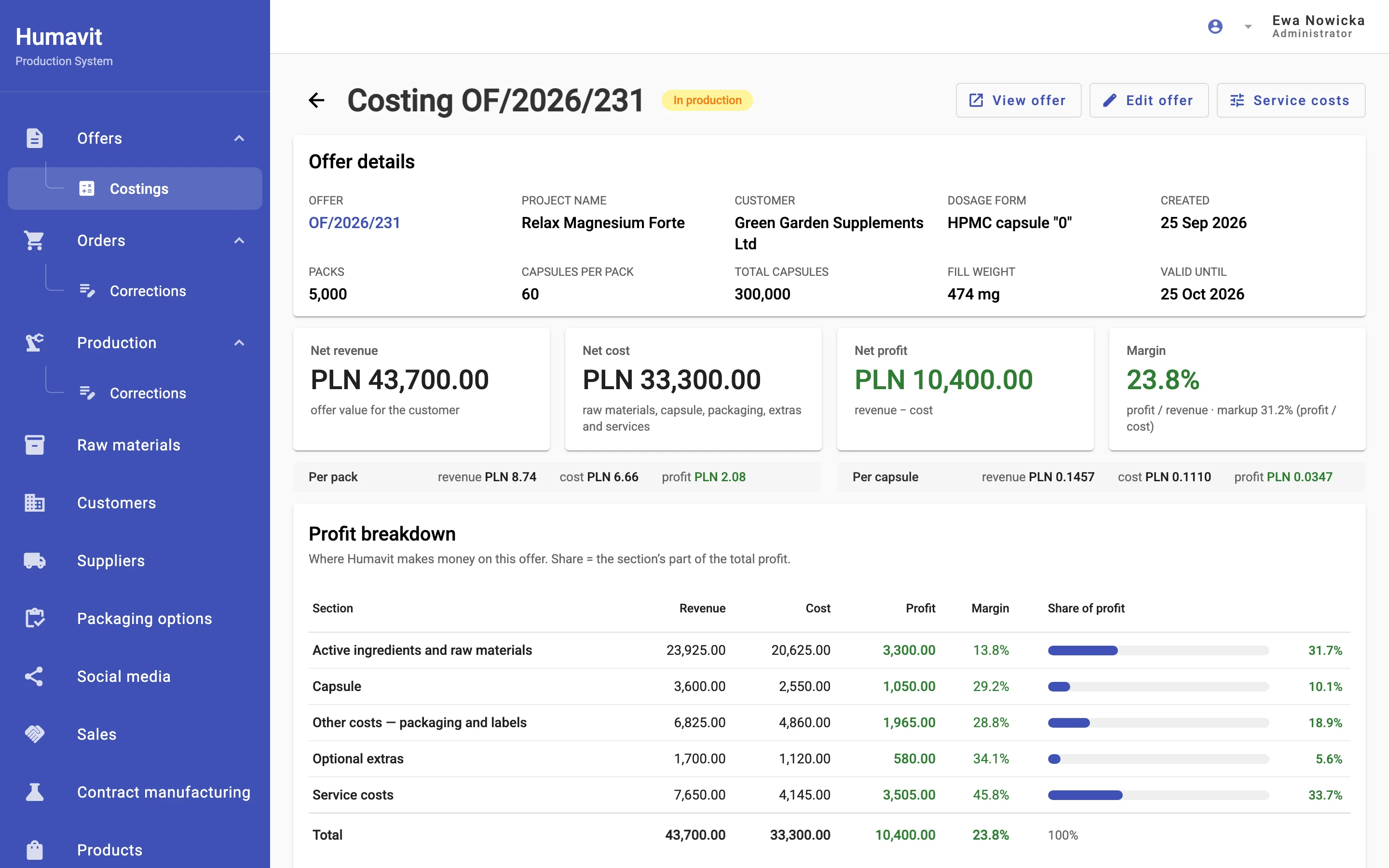
For every offer, see how much the company makes on active ingredients, raw materials, services and other costs.

From the system’s requirements list, abridged

The first version of the system mirrored a flat offer sheet with about 56 columns, with fields such as “actual spend” and “surplus”.

Solution

What does the supplement manufacturing software do?

In practice every order follows the same path: the offer becomes a raw-material order, the order becomes production, and the system matches purchase invoices against the orders. Below are the six main modules I built.

Tab: Offers

Offers costed from the recipe

The calculator takes ingredients from the raw-material catalogue and works out the active-ingredient content with standardisation, the capsule fill percentage and the total per daily dose. It then converts milligrams into kilograms for the whole batch and adds MOQ, surplus and actual spend. The finished offer is generated as a PDF in six languages.

Magnesium citrate for the whole batch

5,000 packs×60 capsules=300,000 capsules

300 mg×300,000÷1,000,000=90 kg

Supplier MOQ
100 kg
Surplus
10 kg
Actual spend
MOQ × purchase price
  • PL
  • EN
  • DE
  • ES
  • FR
  • IT

This is how the code calculates; values from the sample recipe above, fictional data
Tab: Offers → Costings

The margin is visible before the offer reaches the customer

This is the answer to that requirement. For every offer the system calculates revenue, cost, profit, margin and markup, separately for raw materials, the capsule, packaging, extras and services. The cost includes the MOQ surplus the company pays the supplier for. Service rates carry validity dates, so a cost increase doesn’t change old offers. The costing stays in the company’s panel: it never goes into the PDF, an email or the customer portal.

Offer costing — cost, profit and margin structureApp screenshot with fictional data — labels translated from the Polish interface.

Tab: Orders

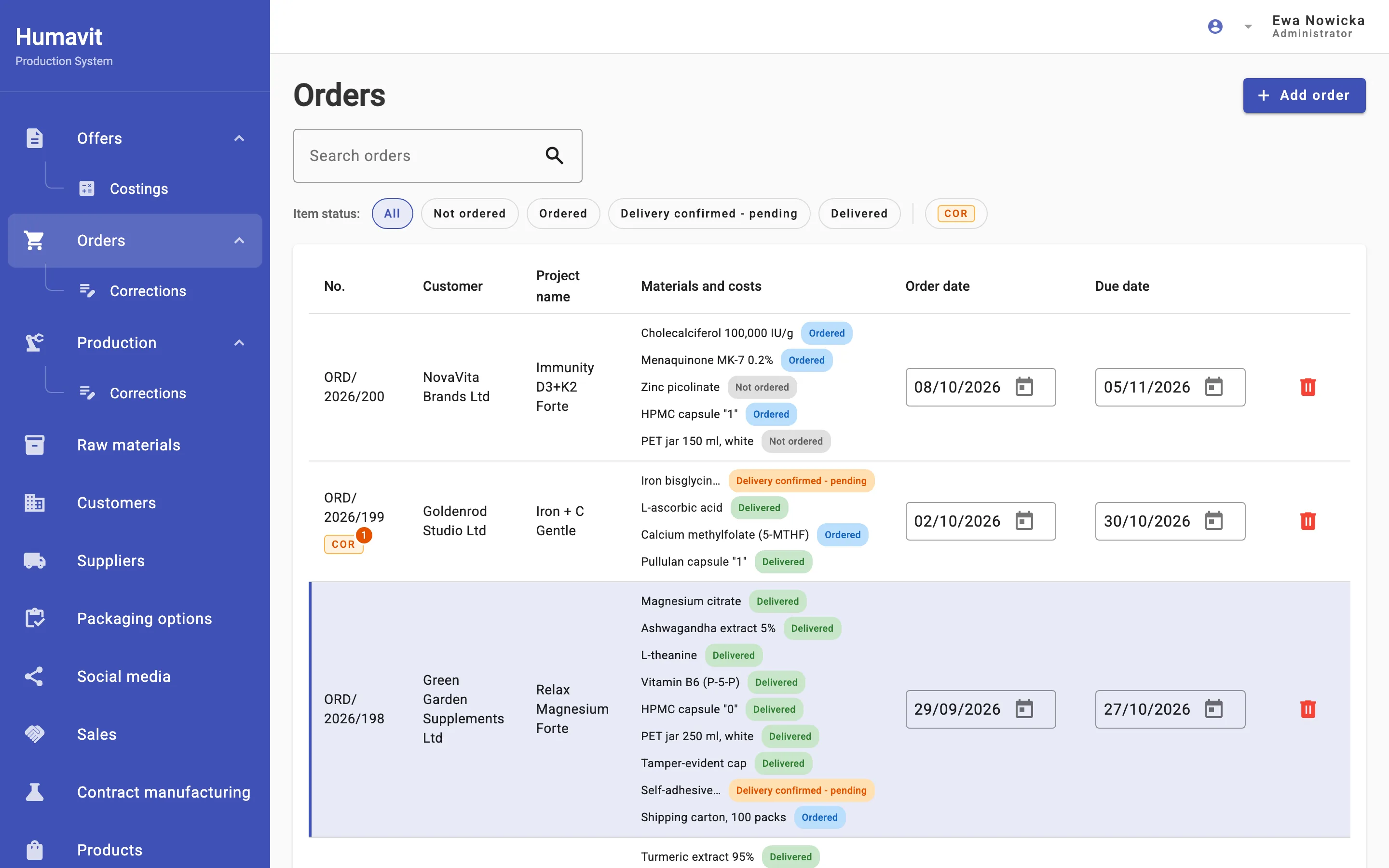
Raw-material orders with delivery tracking

One click turns an accepted offer into an order for raw materials and packaging. Every line has its own status, and the order PDF is generated separately for each supplier. The “Go to production” button appears only once every raw material has arrived.

  • Not ordered
  • Ordered
  • Delivery confirmed - pending
  • Delivered
Raw-material orders — the status of every raw material and packaging itemApp screenshot with fictional data — labels translated from the Polish interface.

Tab: Production

Production in 8 stages, in order

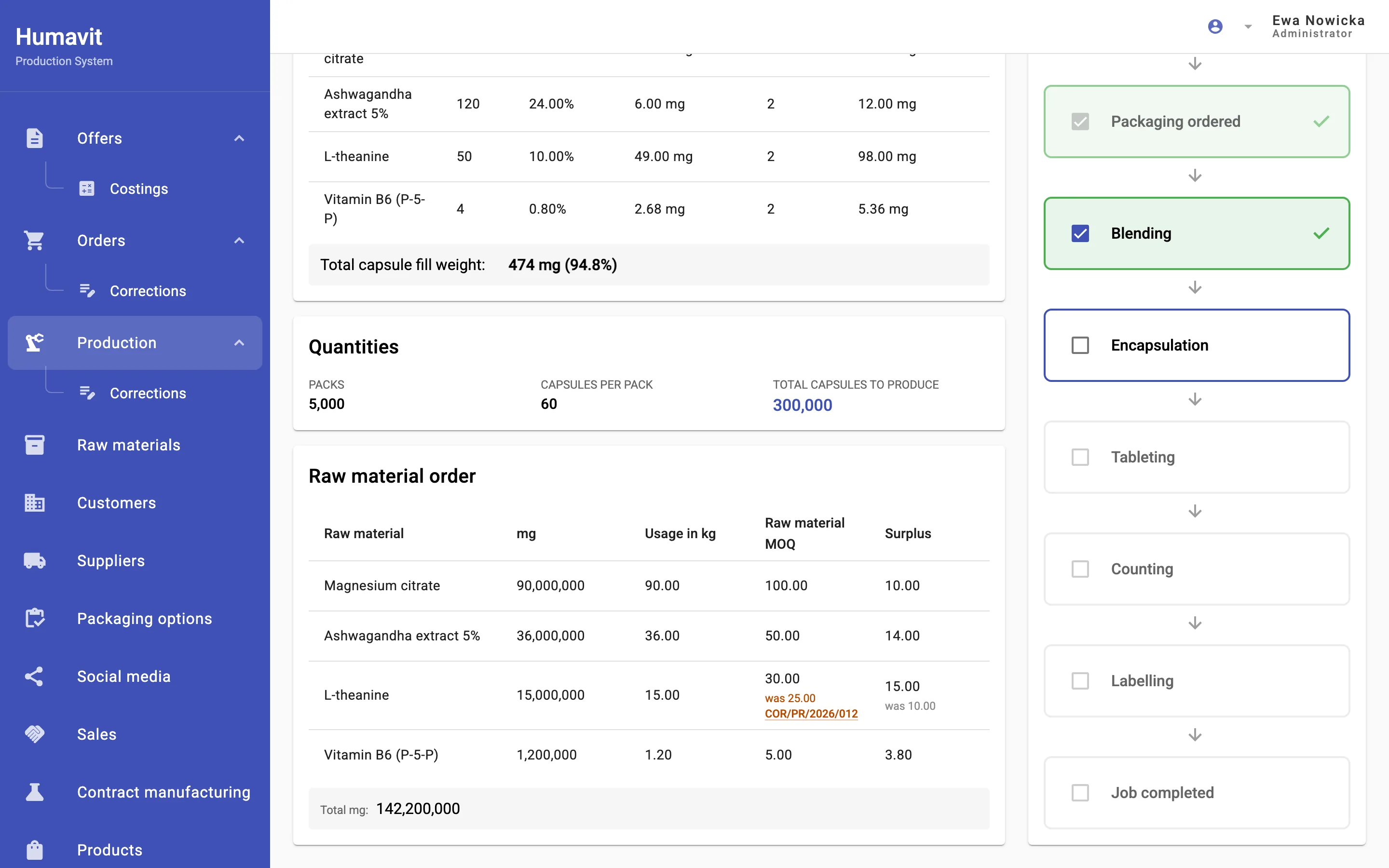
The job card brings together the recipe, the number of capsules, raw-material usage with MOQ, and packaging, without prices. Stages are ticked off in order, with no skipping, and at the end someone enters the production date and batch number. The stage list is shared by capsules and tablets, so on a capsule job the “Tableting” stage is ticked without any work. The offer status updates itself along the way: first to “In production”, then to “Produced” once the job is finished.

Production job card: raw-material usage with an MOQ correction, and the stages (Production → Production details)App screenshot with fictional data — labels translated from the Polish interface.

Production status · job OF/2026/231, fictional data

  • done
  • next
  • waiting
  1. 01 · doneRaw materials ordered
  2. 02 · donePackaging ordered
  3. 03 · doneBlending
  4. 04 · nextEncapsulation
  5. 05 · waitingTableting
  6. 06 · waitingCounting
  7. 07 · waitingLabelling
  8. 08 · waitingJob completed

The stages are shared by capsules and tablets; on capsule jobs, stage 05 is ticked without any work.

Tabs: Orders → Corrections, Production → Corrections

Corrections instead of overwriting

A change after the fact doesn’t overwrite the document. The system issues a numbered correction with the state before and after and the reason, for example an MOQ change. Orders and production have separate correction series. The latest correction can be edited or reversed.

COR/PR/2026/012 MOQ change · Ewa Nowicka
Production correction OF/2026/231
ItemBeforeAfter
L-theanine — MOQ25.00 kg30.00 kg
L-theanine — surplus10.00 kg15.00 kg

Correction from the job card above, fictional data

Tab: Invoices

Invoices from KSeF and PDFs, with no retyping

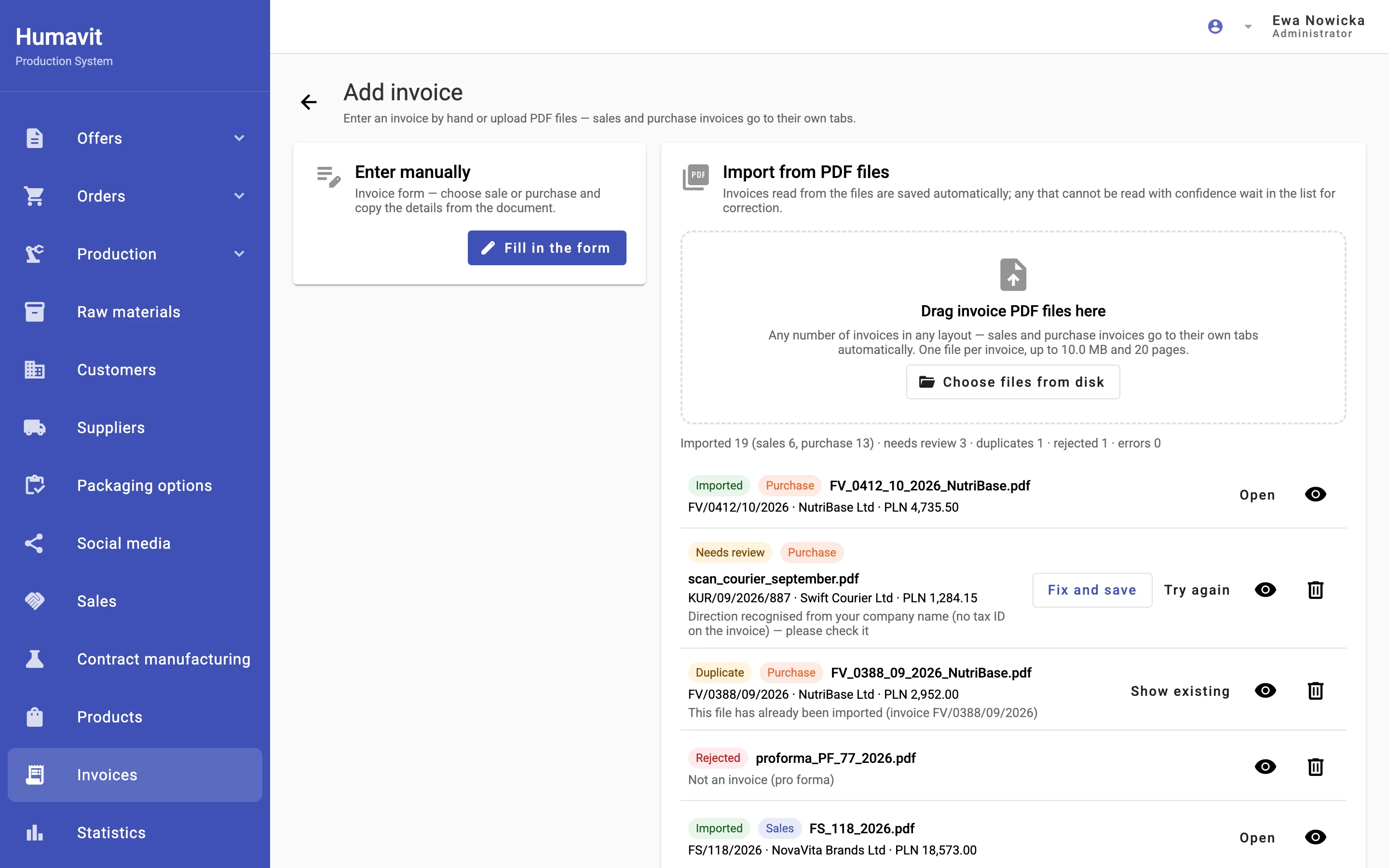
Invoices from KSeF download automatically every 2 hours. A batch of dozens of PDFs, up to 100 per import, just needs to be dragged into the import window. An OpenAI model reads the data from the files through the API. Its responses aren’t stored for later retrieval, and API data isn’t used to train models; OpenAI may keep it for up to 30 days for abuse monitoring. That’s where the AI’s job ends: the code decides from the tax ID whether it’s a sale or a purchase, reconciles the totals, and filters out duplicates and pro formas. Doubtful invoices wait for a person under “Needs review”.

  • Imported
  • Needs review
  • Duplicate
  • Rejected

The person who enters purchase invoices has a separate role and sees only their own tabs.

AI-assisted PDF invoice import — dozens of files at once, split into sales and purchasesApp screenshot with fictional data — labels translated from the Polish interface.

Tab: Statistics

Raw-material orders are matched with purchase invoices from KSeF by the supplier’s tax ID (“Ordered vs invoiced”), so you can see where an order and its invoice differ.

Architecture

How does it work, and what runs in the cloud?

It’s one system with four entry points. The address decides which panel opens; permissions decide what each person sees.

  • Internal panel

    non-public address

    Office, purchasing and production. Permissions are granted tab by tab.

  • Customer Portal

    customer account login

    The customer accepts the offer and clicks “Order production”. They never see purchase prices, suppliers or internal notes.

  • Supplier Portal

    supplier account login

    The supplier enters raw materials, MOQs, prices in PLN, EUR or USD, and certificates. New items wait for approval.

  • Configurator

    see it live, in Polish (opens in a new tab)

    Seven steps from the product name and formula to an enquiry, with no prices. One click turns the enquiry into an offer.

One application server and one database

The server calculates every amount with the same code for the preview and for saving, so the offer preview and the saved document never drift apart.

What runs where
CloudThe system runs on AWS in Frankfurt, not on a server at the plant. The database and attachments are backed up to S3 every 2 hours.
External servicesKSeF, Poland’s national e-invoicing system (invoices every 2 hours), the National Bank of Poland (exchange rates), the GUS business register (company data by tax ID) and the WooCommerce shop (products every hour).
OpenAIReading invoices and price lists from PDFs, translating offers and drafting an offer from a product description. With invoices and price lists the model only reads the data; the code or a person decides what gets saved. The social media module also uses OpenAI and Perplexity for post content.
On-premises optionThe same system can run on your own server (for example a NAS with Docker) instead of AWS; then every part runs under one address.
Automated tests 228 test files for the server 106 for the interface about 60 browser scenarios on the full system

Timeline

In what order were the modules built?

The system was built in stages: the core first, then portals for customers and suppliers, then sales, and finally invoices and corrections. The dates come from the code’s change history.

  1. January–March1/4

    Core

    • prototype: offers, orders, production
    • backend and database
    • orders and production linked to the offer
    • capsules and tablets in the calculator
    • AWS deployment prepared
  2. April–May2/4

    Portals

    • backups to S3
    • Customer Portal with offer acceptance
    • offer statuses linked to production
    • Supplier Portal and raw materials online
  3. June–July3/4

    Sales and configurator

    • users and roles
    • sales: leads and contact history
    • sales offers, WooCommerce products, statistics
    • public contract-manufacturing configurator
  4. August–October4/4

    Invoices and corrections

    • invoices from KSeF
    • order and production corrections
    • AI-assisted PDF invoice import, margin costings
    • latest code change

9 months · one engineer

Results

What changed in the office and on the shop floor?

I list only what follows directly from how the system works.

  • The margin on every offer is visible before it’s sent: by section, per pack and per capsule.
  • Missing raw materials and packaging show up in one view, and production starts only when every raw material has arrived.
  • After-the-fact changes to orders and production stay in the history as corrections, with a date and an author.
  • Nobody retypes invoices: the ones from KSeF download by themselves, AI reads the PDFs under the code’s control, and a person fixes only the doubtful ones.
  • Raw-material orders can be compared with purchase invoices from KSeF, supplier by supplier.
  • Customers accept offers in their own portal, and suppliers update their raw materials and prices themselves.

FAQ

Questions about supplement manufacturing software

How much does a system like this cost?

A custom system built on your company’s data usually costs PLN 40,000–120,000 excl. VAT (about €9,100–27,400) and takes 2–3 months. This one is larger: the core, meaning offers, raw-material orders and production, took about 10 weeks, and I added the portals, sales, invoices and corrections over the following six months. To start, I suggest a proof of concept on your own data for PLN 10,000–25,000 (about €2,300–5,700); maintenance is PLN 1,000–2,000 a month (about €230–460). I break down typical budgets in my article on the cost to build an app in Poland.

Euro amounts use the National Bank of Poland rate of 9 October 2026 (PLN 4.3775 per euro).

How long does implementation take?

On this project I built offers, raw-material orders and production in the first quarter of 2026. Further modules followed every few weeks, until October. In practice I start with a proof of concept on your data that takes 2–4 weeks, and then roll out in stages.

Where is our data, and what does the AI see?

The data sits in a database on an AWS server in Frankfurt, and backups go to S3 every 2 hours. OpenAI receives only what a user passes to the model, for example an invoice PDF. For invoices, the model’s responses aren’t stored for later retrieval, and API data isn’t used to train models (OpenAI may keep it for up to 30 days for abuse monitoring). The portals get only selected fields: a customer never sees purchase prices, suppliers or margins.

Will it connect to the tools we already use?

Yes, if your system has an API or can export data. Here the system pulls invoices from KSeF, exchange rates from the National Bank of Poland, company data from the GUS business register and products from the WooCommerce shop. I connect Comarch ERP, SAP or IFS the same way: the ERP stays where it is, and the new tool works with its data.

What if the only developer is unavailable?

The system has almost 400 automated test files: for the server, for the interface and full browser scenarios. It runs from Docker images, on AWS or on your own server. The stack is mainstream (Java, Spring Boot, Angular), so another team can take over the code. We agree code ownership, repository access and handover terms in the contract before work starts.

Show me one order, from enquiry to invoice

An offer, a supplier order and a production card are enough, even from a spreadsheet. From those I’ll propose a proof of concept on your data: 2–4 weeks, PLN 10,000–25,000 excl. VAT (about €2,300–5,700).

Call +48 517 297 217

Prefer to write? Get a quote

Rafał Szewc

Rafał Szewc

Software engineer, 12+ years, previously at SAP. You talk directly to the person who writes the code.

About me
WhatsApp