
Document: RS-MZ-2026-01 Standard: EN 10204 3.1 Revision 2 Page 1/1
Client

Reading mill certificates with a local AI model
Mostostal Zabrze is an engineering and construction company: steel structures and industrial installations. On a stainless-steel piping job, every line of the bill of materials had to be matched by hand to its 3.1 certificate in a supplier package of more than 200 pages. I built a tool for that. A local AI model reads the mill test certificates, and the program picks the right certificate by heat number, writes its number into Excel and cuts the page out into a labelled PDF.
- Outcome
- the certificate number in column K and a labelled PDF for every resolved line; ties, conflicts and gaps are left for a person to check
- Scope
- material documentation for a stainless-steel piping installation (3.1 certificates, the spreadsheet, extracted PDFs)
- Technology
- Java 21, Spring Boot, Ollama with a local vision model, PDFBox, Apache POI
- Period
- July–September 2026, two stages
- Status
- tested on a supplier package, September 2026
- Prepared by
- Rafał Szewc, RS Mobile
-
1 · Heatcol. J
- Pos.
- 147
- Item
- 90D LR Elbow 8″ S-10S
- Heat
- Y25H0731
bill of materials line
-
2 · Certificatep. 121
- No.
- DF2609180042
- Heat
- Y25H0731
- Score
- 13/14
4 candidates, 2 rejected (different product)
-
3 · Sheetcol. K
- J
- Y25H0731
- K
- DF2609180042
- L
- 147_P27
backup before writing
-
4 · PDFcol. L
147_P27.pdf
How it worked before
The bill of materials for the installation is an Excel sheet. Each line has a code, a description, a DN, a wall thickness, a material grade and a heat number. For every line, someone had to find the 3.1 inspection certificate by hand in the supplier’s documentation package. That package is a single PDF in which certificates are mixed with certificate lists, purchase orders, TÜV and PED approvals and cover sheets.
Ctrl+F only gets you so far. Some pages are scans without a text layer, some are rotated, and many certificates are bilingual, in Chinese and English. The hardest part is that one heat appears in several certificates at once — for an elbow, a tee and a reinforcement plate, for example. Right next to it sit numbers that are easy to mix up: lot numbers, licences, approvals and order numbers.
Each line took five manual steps, listed in the box. The client gave me a sample of a finished file with the red stamp, and the tool prepares its PDFs to match it.
Manual procedure · one line
- Find the certificate carrying the line’s heat number in the package.
- Check product, size and quantity, because the same heat appears in several certificates.
- Copy the certificate number into column K.
- Cut the page and its continuation pages into a PDF named with the code from column L.
- Stamp the file name in red, vertically, in the bottom-right corner.
Scale: the package I tested the tool on had 238 pages.
What I built
I describe the tool in six parts. M1–M5 cover the certificate search (September 2026); M6 is the earlier stage from July: copying certificate data into Excel.
Note
The tool has no graphical interface today. A run is started with a command, and the output is files: the spreadsheet with column K filled in, a folder of extracted PDFs and a report with the score and reasoning for every row. The screens below are a design for a panel working on the same data. I haven’t built that panel yet.
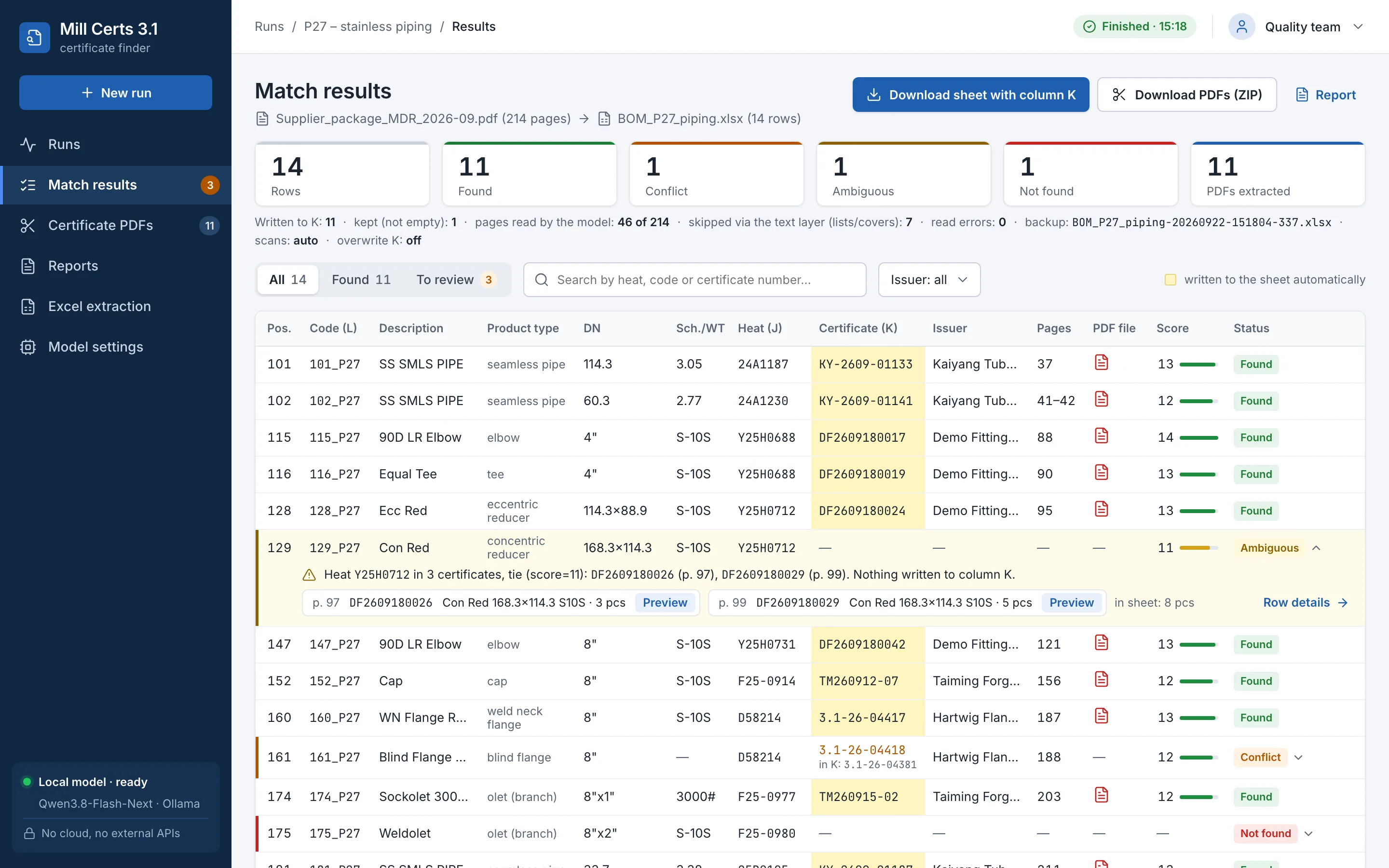
A result for every line of the bill of materials
For each row of the sheet, the tool looks for a certificate by heat number. It writes the number of the certificate it finds into column K, and every row gets a status, so you can see straight away what needs a manual check.
Fig. 1 · Interface concept, fictional data
Row statuses
| Status | When | What the tool writes |
|---|---|---|
| Found | one candidate wins on score | the number in column K and an extracted PDF |
| Ambiguous | candidates tie | nothing; a person decides |
| Unread | the model could not read a candidate page | nothing; the page comes back in the next run |
| Conflict | column K already holds a different number | the existing entry stays |
| Row changed | someone edited the row during the run | the row is skipped |
| Not found | no certificate read so far has this heat | nothing |
Before every write, the tool saves a time-stamped copy of the sheet. A sheet that is open in Excel stops the run from starting, and overwriting an existing entry needs a separate decision by the operator.
Scoring instead of guessing
Every certificate that carries the row’s heat number gets points: up to 5 for the heat, 3 for quantity, up to 2 each for product type and dimensions, and 1 each for schedule and grade — 14 at most. A certificate for a different product is ruled out at once. A tie is settled by the number on the supplier’s certificate list; if that is not enough, the row is marked Ambiguous instead of being filled in.
Fig. 2 · Interface concept, fictional data
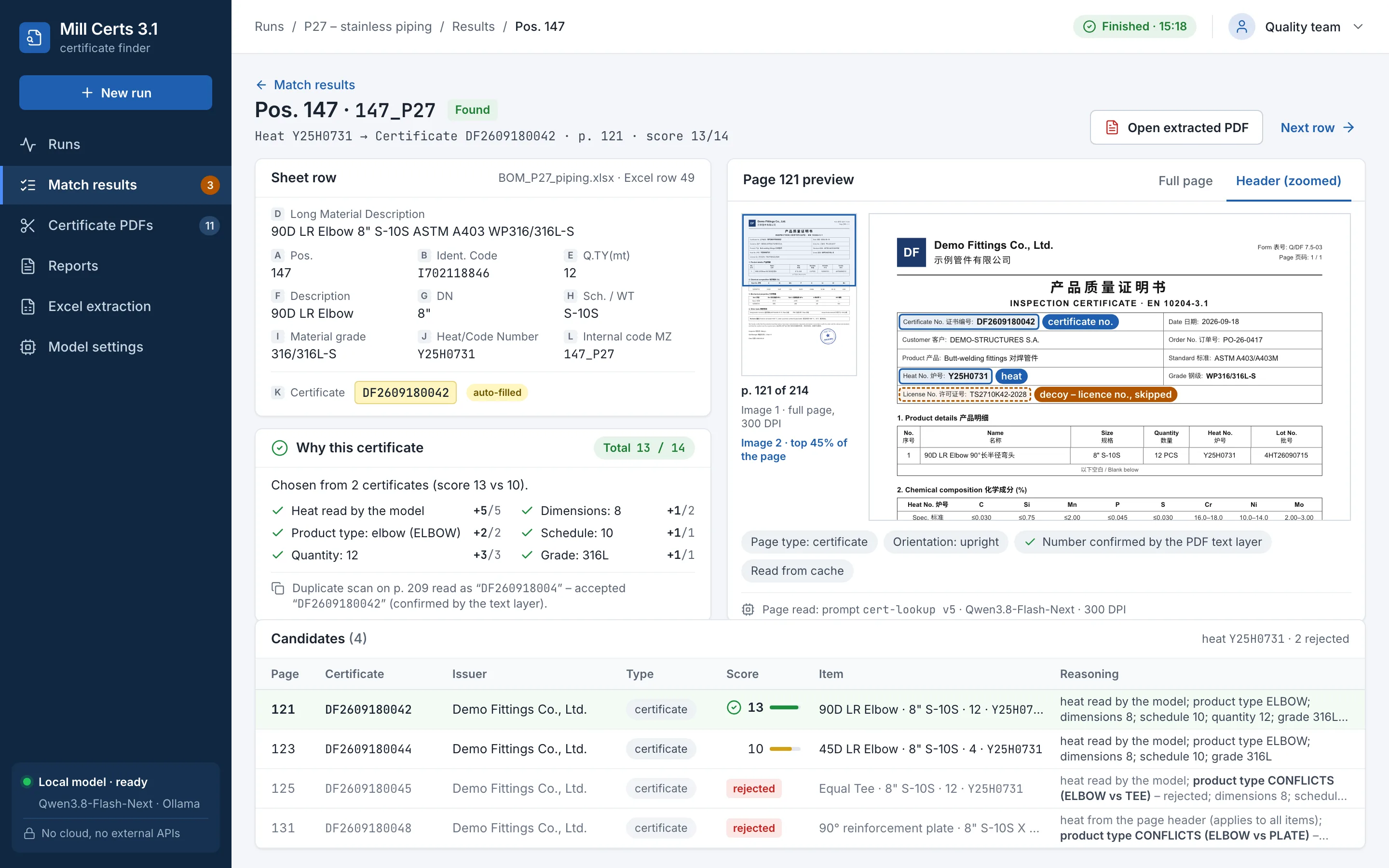
Decoy numbers on the certificate page
The vision model gets two images: the whole page at 300 DPI and an enlarged header, where the certificate number and the heat number sit. The prompt forbids guessing and tells the model to copy the numbers verbatim first and only then fill in the fields. That cuts mistakes down but does not rule them out, so the result still goes through scoring and statuses. A page lying on its side is read again after the image is rotated.
Numbers on a certificate page
| On the page | What it is | In the tool |
|---|---|---|
| Heat No., Schmelze, Charge | heat number | matching key |
| Certificate No., MTC No. | certificate number | written to column K |
| Lot No., Batch No. | lot or batch | decoy, never written to K |
| License No. (TS) | manufacturer’s licence | decoy, never written to K |
| PED, TÜV, ISO | approvals and system certificates | decoy, never written to K |
| Order No. | purchase order number | decoy, never written to K |
Text first, model second
Reading one page with the model takes minutes, so the tool first searches the PDF’s text layer for heat numbers and the numbers on the supplier’s lists. Cover sheets and certificate lists drop out without being read. Each further round runs only for rows that are still unresolved.
- Round 1Candidate pages from the text layer
- Round 2Scans without a text layer
- Round 3Remaining pages, full mode only
- Round 4A check question about heat numbers
An extracted PDF with the code stamped on
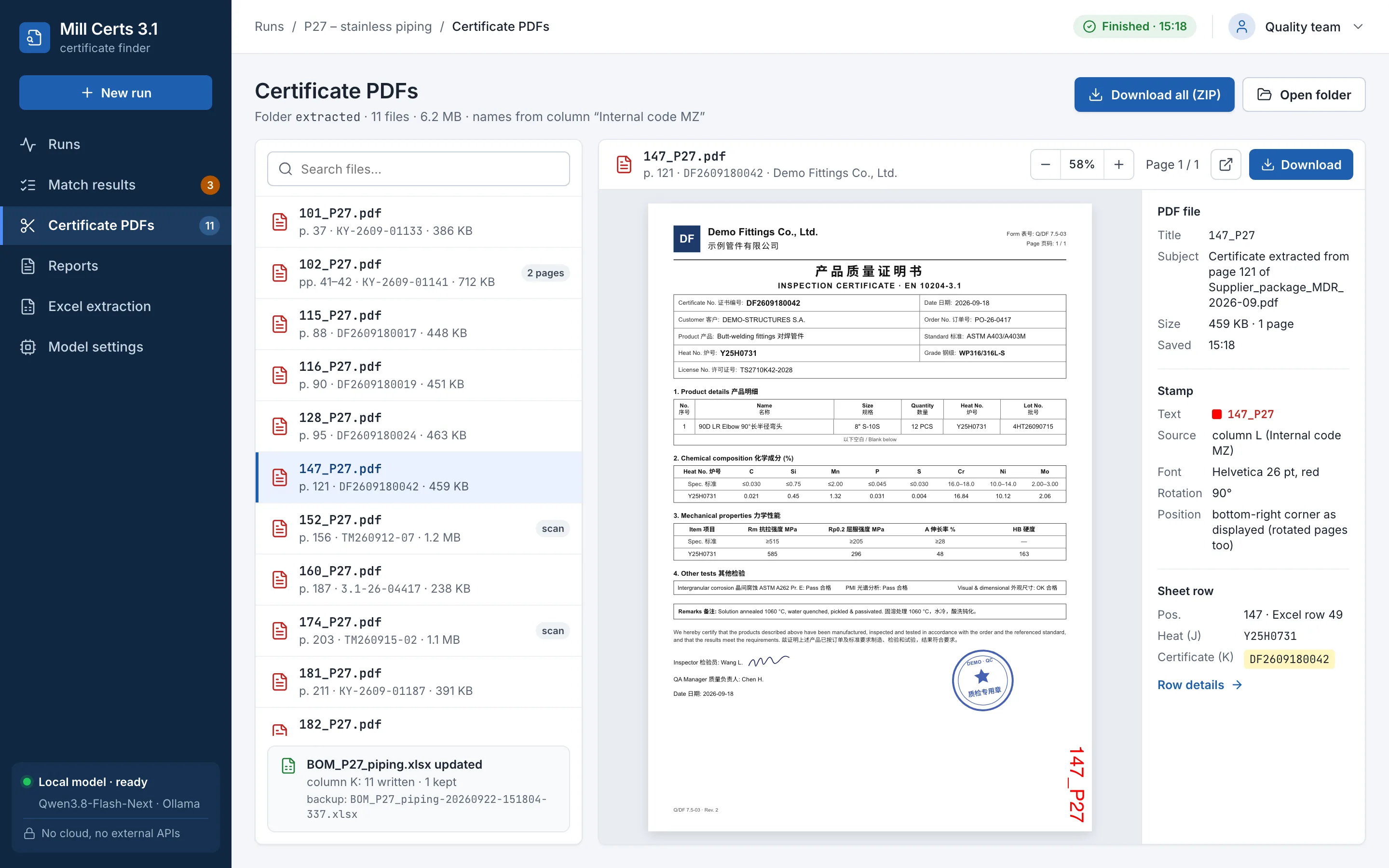
The certificate page and its continuation pages, up to five in total, go into a file named with the code from column L. Every page gets that name stamped vertically in red in the bottom-right corner, as in the client’s sample — rotated pages included. A PDF is created only for rows written to the sheet.
Fig. 3 · Reproduction of an extracted PDF, fictional data
Stage 1: certificate data into Excel
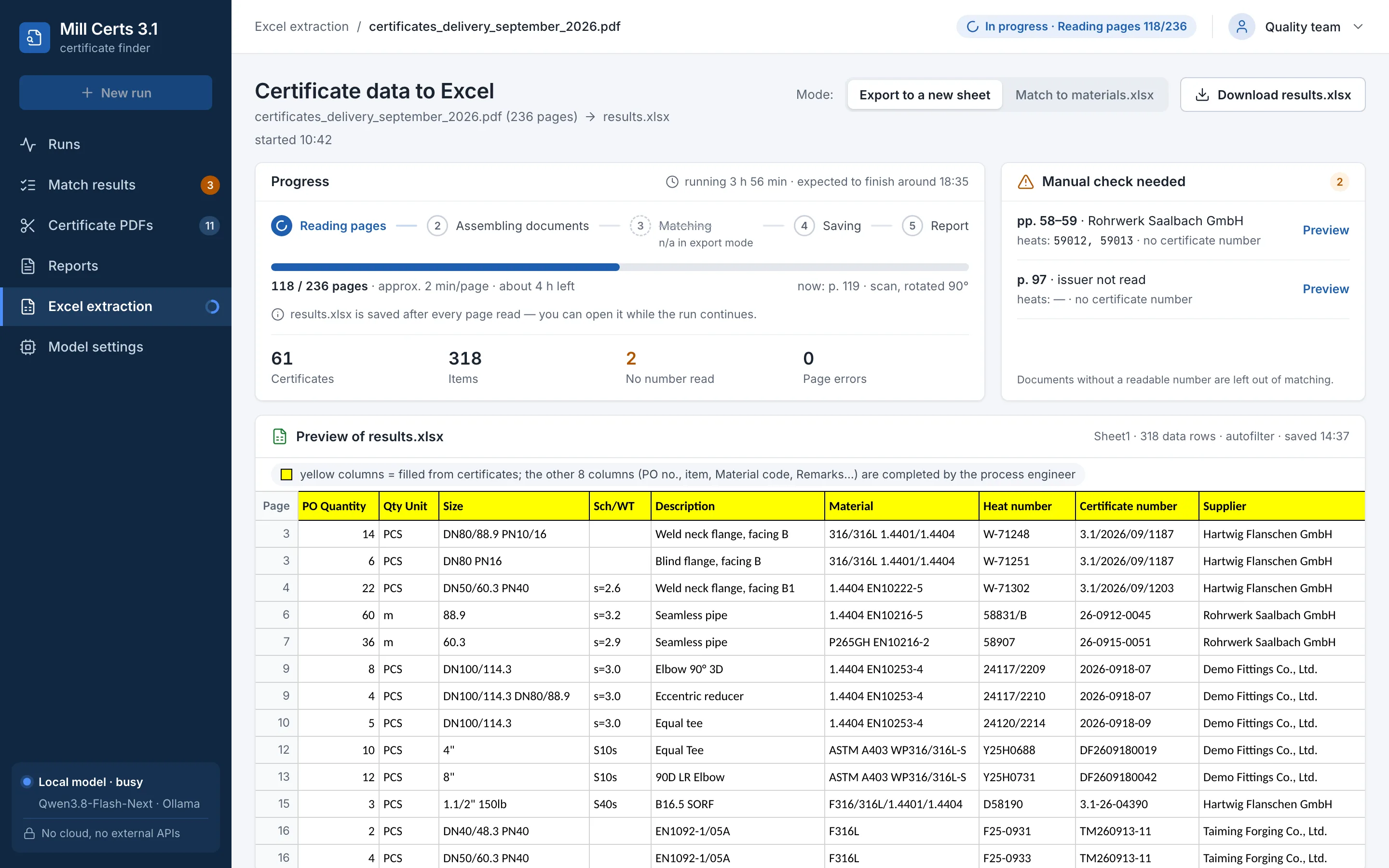
The stage 1 module copies every item of every certificate into a sheet laid out like the client’s bill of materials: heat, certificate number, grade, size, wall thickness, quantity and supplier. Product names stay word for word — the full name of a weld neck flange rather than an abbreviation — because a process engineer reads the sheet. The file is saved after every page read.
Fig. 4 · Interface concept, fictional data
How the tool works
The whole thing is one Java service (Spring Boot) with no database. It takes the supplier’s PDF and the bill of materials sheet, and returns the same sheet with column K filled in, a folder of extracted PDFs and a report listing the candidates and the reasoning for every row.
Pages are read by a vision model from the Qwen family, run locally through Ollama. The model settings are deterministic, and every page read is cached, so a repeat run does not read the same pages twice. A large package still takes hours, because the model reads page by page and only one job runs at a time.
Local, no cloud
- the vision model, run through Ollama
- supplier PDF packages and bill of materials sheets
- extracted PDFs, reports and the page-read cache
In the cloud
Nothing. Pages and sheets are not sent to any cloud service or external API.
Project timeline
Dates mark when each stage was finished, not when work started.
| Date | Stage | What was delivered |
|---|---|---|
| by 24 Jul 2026 | Stage 1 | Certificate data into Excel: assembling multi-page certificates and exporting them in the layout of the client’s bill of materials. |
| by 4 Sep 2026 | Stage 2 | A certificate for every row of the bill of materials: candidate scoring, the number in column K, an extracted PDF with the stamp. Test runs on the supplier package on 3–4 September. |
| 5–6 Sep 2026 | Model choice | Three local models compared on an M3 Max with 128 GB of memory; switched to the fastest. Code status: 109 automated tests. |
Outcomes
- The certificate number goes into the same column K as with manual work, so the documentation format does not change.
- The extracted PDF carries the file name and stamp from the client’s sample, so nobody has to label it by hand.
- Rows without the Found status go to a manual check, and every choice comes with a score and its reasoning.
- Certificates and bills of materials are not sent to any cloud service, because the model runs locally.
Questions about reading mill certificates
What does a tool like this cost for our plant?
A pilot on one documentation package usually costs PLN 10,000–25,000 net (≈ €2,300–5,700) and takes 2–4 weeks. A tool rolled out on your company’s data is PLN 40,000–120,000 net (≈ €9,100–27,400), and an on-site server for the model PLN 15,000–35,000 (≈ €3,400–8,000). Euro amounts use the National Bank of Poland rate of 9 October 2026 (1 EUR = 4.3775 PLN). More on how I price pilots and builds: How I work.
Do the certificates go to the cloud?
No. The model runs locally, and the tool does not send files to any cloud service or external API. It can run on a server at your plant.
What if the model misreads a number?
It can happen, especially on a poor scan. That is why a number goes into column K only when the certificate carries the row’s heat number and one candidate wins on score. On a tie or an unread page, the row stays empty and is flagged for checking. For every entry the report gives the source page, and the extracted PDF lets you compare the number in a few seconds. A copy of the sheet is always saved before writing.
How long does it take?
For Mostostal, stage 1 was ready by the end of July and stage 2 by early September 2026. A pilot on a new type of document usually takes me 2–4 weeks.
Will it work with our spreadsheets and ERP?
Usually, yes. The tool finds columns by their headers (heat, certificate, internal code), so their order does not have to match, and I check a different layout during the pilot on your file. At Mostostal, Excel and PDF files were enough, with no ERP connection. If your bill of materials lives in Comarch, SAP or IFS, I can read it straight from the system.
Let’s test it on one package of your certificates
If someone at your company copies numbers from PDFs into Excel, tell me how the process works today. I start with a pilot on one package of your documents (PLN 10,000–25,000 net, ≈ €2,300–5,700; 2–4 weeks). You talk directly to me, the engineer who writes the code (12+ years of experience, previously at SAP). I reply on WhatsApp within one business hour.